Best Invoice App for Contractors (2026): 11 Ranked
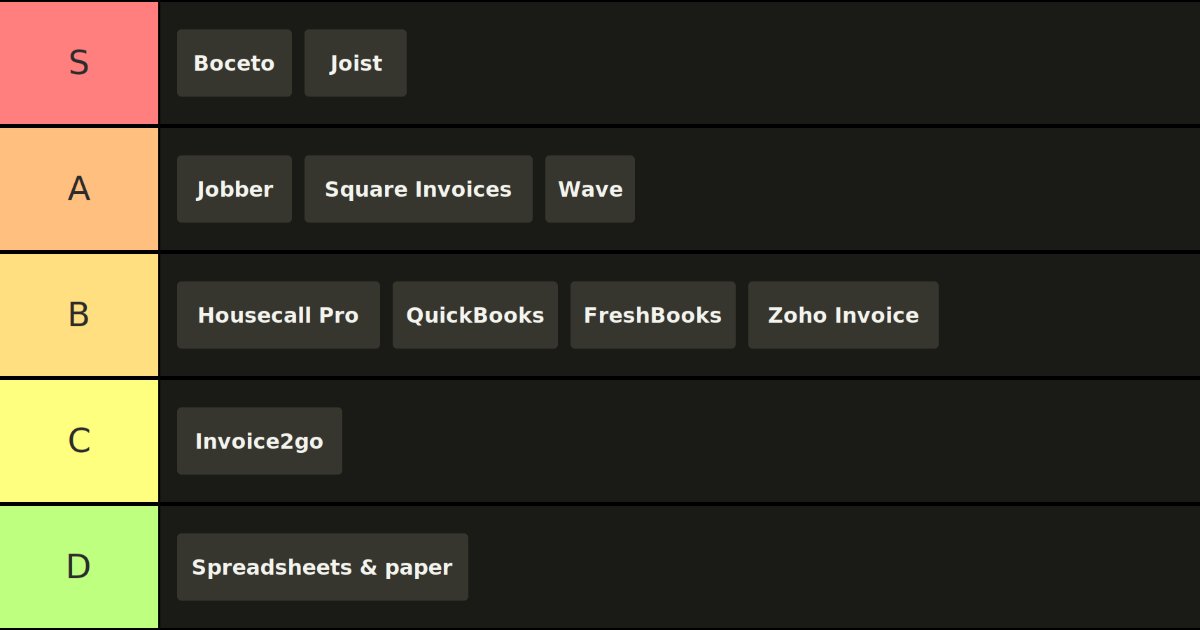
Every "best invoice app" list ranks the same way: whoever pays the most for placement lands at number one. This one ranks for one person instead. You are a solo tradesperson or a small crew. You quote from your truck or the customer's driveway, not from a desk. You want a professional estimate out the door before you leave the job, an invoice that follows without retyping, and money in your account without chasing. That is the job. Everything below is graded against it.
Full transparency: this is Boceto's blog, and Boceto is in the S tier. That ranking has to earn its place, so we show our work on every tool, we name exactly where Boceto loses, and we do not invent weaknesses for anyone else. If you finish this and pick a competitor because it fits your work better, the list did its job.
How we graded
Seven things decide the grade. They are weighted toward the field, not the office.
- Speed to a finished quote. The single number that matters. A quote sent within hours closes far more often than one sent three days later. Slow tools cost jobs.
- Job-site usability. Does it actually work one-handed on a phone, or is it a desktop tool with a phone app bolted on.
- Real monthly cost. Not the advertised price. The price after the add-ons you are forced to buy and the payment processing fee.
- Getting paid. Can the client tap and pay a card or bank transfer from the invoice itself.
- AI input. Can you describe the job by voice, photo, or a few words and have the app draft the itemized estimate, or do you type every line yourself.
- Spanish. Roughly nothing on the market is built for the Spanish-speaking contractor working in Canada or the US. If your customer or your crew works in Spanish, this matters and almost no one serves it.
- Room to grow. Scheduling, dispatch, job costing, full accounting. The big platforms win here. A solo quoting a fence does not need it, and paying for it is the most common way contractors overspend.
Grades are for the reader described up top. Where a tool is a much better fit for a different reader (a 12-person HVAC company, say), the writeup says so.
The tier chart
Prices verified against vendor pricing pages and review sources in 2026. They move constantly, and several of these companies raised prices this year. Confirm the current number on the vendor's own pricing page before you commit.
S tier: the fast-quote specialists
Boceto
Grade: S. Describe the job by voice note, a photo, or a couple of typed lines, and Boceto drafts a priced, itemized, professional estimate in seconds. You edit it, send it by WhatsApp, email, or text, and it becomes an invoice without retyping. The client pays the invoice by card. All of that works in English or Spanish, on any phone, and it is free to start with no card up front.
That last part is the reason it is here. Every other tool on this list makes you build the estimate line by line. Boceto writes the first draft for you, which is where the speed comes from, and it is the only tool built for the contractor who quotes in Spanish for customers in Canada or the US. On the two things this list weighs most, raw speed to a finished quote and Spanish, nothing else matches it. If you want to see how that works in practice, we wrote up how photo and voice turn into a priced estimate, including where the AI stops and you take over.
Where Boceto loses, plainly. It is the youngest and smallest tool here. It does the core loop (quote, invoice, get paid) and does not try to be your scheduler, your dispatcher, your GPS tracker, or your accounting system. If you run multiple crews across job sites and need to assign work and track hours, Boceto is not that tool yet, and Jobber or Housecall Pro will serve you better. Deep reporting and full bookkeeping live elsewhere. Boceto is a specialist, and the specialty is being the fastest way to turn a described job into a professional quote your customer trusts.
Best for: solo operators and small crews who quote and bill from the field and want the least admin possible, in English or Spanish.
Joist
Grade: S. For years Joist has been the default answer to "what do contractors actually use." It is purpose-built for the trades, it is the cheapest dedicated contractor tool on this list, and it does estimates and invoices simply on a phone. Plans run about $10 a month for Basics, $17 for Pro, and $32 for Elite, with a 14-day trial and two months free on annual billing. Pro adds logo branding, custom contracts, e-signatures, work orders, and notifications when a client opens your estimate or invoice. Payments and homeowner financing are available on every plan.
Where it slips. The free plan is gone. Joist ran free for years, then moved to paid only, and long-time users in the app store reviews are blunt about repeated price increases since. Recent reviews also report real reliability and support problems: outages that block sending invoices, thin customer support, and aggressive auto-renewal billing. Plans are all-or-nothing, so you cannot buy just the one advanced feature you want. And the entry plan caps how many documents you can send per month, which is easy to hit in a busy season.
None of that is disqualifying at ten dollars a month. Joist remains the strongest dedicated estimate-and-invoice app for contractors who do not need AI drafting or Spanish, and it earns S on fit and price rather than on generosity.
Best for: contractors who want a proven, inexpensive, trade-specific tool and are fine typing their own line items.
A tier: excellent, with a catch for the solo
Jobber
Grade: A. Jobber is widely considered the best all-in-one for field-service businesses, and for good reason. Scheduling, quoting, job tracking, invoicing, and automated payment reminders live in one polished app, and the mobile experience is genuinely excellent. Crews can invoice on site and clients can pay immediately.
The catch is the reader. Jobber starts around $39 a month for a single user and climbs steeply with crew size, with team plans reaching well into the hundreds per month, and some capabilities sit behind paid add-ons. If you are a solo who only needs to quote and invoice, you are paying for scheduling and dispatch you will not use. For a growing service team, Jobber is an S. For a solo quoter, it is more tool and more money than the job requires.
Square Invoices
Grade: A. If your real problem is getting paid, Square Invoices is one of the cleanest answers on the market. Unlimited invoicing with no monthly fee, a fast and trusted checkout, and the same Square payment rails a lot of trades already use. Send an invoice, the client taps and pays.
It loses points on fit, not quality. It is generic billing software, not a contractor tool, so there is no AI estimate drafting, no trade-specific templates, and only partial Spanish. You build every estimate yourself, which means you also carry the discipline of getting the document right. If that is your route, here is what belongs on a contractor estimate, line by line. Best for the tradesperson whose priority is frictionless payment over fast quoting.
Wave
Grade: A. Wave is the standard free choice for North American solos, and the free Starter tier is genuinely free: unlimited invoices and estimates plus light bookkeeping at no monthly cost. That is a real gift for someone starting out. Pro runs $19 a month, or $190 a year, and adds automatic bank feeds, unlimited collaborators, and removes Wave branding.
Two honest knocks. The mobile app is less polished than the tools built phone-first. And card processing runs 2.9 percent plus $0.60 per transaction on the free tier, which adds up on big invoices, though Pro waives the fixed sixty cents. It is not contractor-specific, and there is no AI drafting or Spanish. Best for the cost-conscious solo who wants free invoicing plus simple books in one place.
B tier: strong tools, wrong shape for this reader
Housecall Pro
Grade: B. Housecall Pro is a genuinely powerful platform for home-service businesses, with dispatching, customer communication, review requests, and marketing built in. If you run an established plumbing, HVAC, or electrical shop with a team, it can save real hours.
For the solo it is the wrong shape and the wrong price. There is no permanent free plan, the entry tier runs roughly $59 to $79 a month, and features most people actually need (accounting sync, GPS, a real estimate builder) sit on higher tiers or behind paid add-ons. The most common complaint is cost creep: users who sign up at the advertised price and find themselves paying far more within a month or two. A-tier for a funded home-service team, B here because it overshoots the solo on both features and cost.
QuickBooks Online
Grade: B. QuickBooks Online is the accounting powerhouse. If you need real bookkeeping, expense tracking, tax reports, and bank reconciliation, nothing on this list matches it, and invoicing is included. Plans run roughly $25 to $80 a month.
But this list is about quoting and invoicing from the field, and for that narrow job QuickBooks is heavy and desk-oriented. It is more software than a solo needs just to send a quote, and the learning curve is real. Best when your accountant, not your job site, is driving the decision.
FreshBooks
Grade: B. FreshBooks is clean, simple, and pleasant to use, with tidy invoice templates and good automated payment reminders. It makes billing feel easy.
It leans toward the desk rather than the driveway, and the entry plan caps you at a small number of billable clients before you have to move up, with prices climbing from the low twenties into the fifties. It is built for freelancers and service pros generally rather than the trades specifically. No AI estimate drafting, no Spanish. A fine pick if your work is light and office-based more than field-based.
Zoho Invoice
Grade: B. Zoho Invoice is surprisingly capable and genuinely free, with time tracking, expense recording, online payments, and yes, Spanish. On features per dollar it is hard to beat.
The drawback is that it is a gateway into the broader Zoho suite, and the interface is more complex than a solo tradesperson needs. If you are not already using Zoho CRM or Zoho Books, it can feel cluttered for the simple task of sending a quote. Best for someone already inside the Zoho ecosystem.
C tier: fine for very light use
Invoice2go (BILL)
Grade: C. Invoice2go is cheap to start, around $6 a month on annual billing, and easy to send a clean invoice from a phone, which is why a large share of its users are contractors. It does the basics.
The problems add up for a working contractor. The lower plans cap how many invoices you can send, so the popular middle tier allows about a hundred a year and unlimited sits near $40 a month. Card processing fees vary by tier rather than being one flat rate, template customization is limited, and reviewers report frequent price increases. It is now part of BILL, which pushes it toward the broader BILL platform. Fine for someone sending a handful of invoices, thin for anyone quoting real volume.
D tier: the tool most contractors actually still use
Spreadsheets, paper, and the notes app
Grade: D. This is the honest one, and it is the real competition for every app above. Most tradespeople do not lose money because of bad work. They lose it because the estimate went out three days late, the invoice sat in a notes app, and the follow-up never happened.
Free has a price. A handwritten or spreadsheet quote looks less professional, is slow to produce after a ten-hour day, invites math errors, has no way for the client to pay, and leaves you nothing to track. It also tends to skip the parts that protect you: a clear scope, what is not included, a validity window on the price, and deposit terms that are legal where you work. If you take one thing from this list, it is not which app to buy. It is that almost any of the tools above beats paper, because the fastest professional quote wins the job, and paper is never the fastest.
How to actually choose
Skip the feature checklists and match the tool to how you work.
If you want the fastest possible quote and you or your customers work in Spanish, start with Boceto. If you want a proven, dirt-cheap, dedicated estimate-and-invoice app and you do not mind typing your line items, Joist. If you run a team and need scheduling in the same app, Jobber. If your one real problem is getting paid, Square Invoices. If you want free invoicing plus simple books, Wave. If you need full accounting, QuickBooks.
Whichever you pick, the document still has to be right, and the words on it matter more than the logo in the corner. If you are unsure when to send which one, estimate, quote and invoice do three different jobs.
And do the two-week test on real jobs, not a demo script. Time how long it takes to build a quote, fix a mistake, and get paid. The fastest clean workflow wins. It almost always does.
Try the fast-quote approach on your next job
Boceto turns a voice note, a photo, or a few typed words into a professional itemized estimate in seconds, in English or Spanish, then into an invoice you can send by WhatsApp, email, or text and get paid on. It is free to start, with no card up front.
| App | Starts at | AI writes the estimate | Spanish | Best for |
|---|---|---|---|---|
| Boceto | Free to start, 10 AI estimates plus 2 invoices for free | Yes, voice, photo or text | Yes, full | Fastest quote from the field |
| Joist | $10 for 5 documents a month | No | No | Trade specific |
| Jobber | $39 a month | No | No | Teams that need scheduling too |
| Square Invoices | Free | No | Partial | Getting paid with the least friction |
| Wave | Free, Pro $19 | No | No | Free invoicing plus simple books |
| Housecall Pro | About $59 to $79 | No | No | Established home service teams |
| QuickBooks | About $25 to $80 | No | Partial | When you need real accounting |
| FreshBooks | About $23 | No | No | Light, office based work |
| Zoho Invoice | Free | No | Yes | People already inside Zoho |
| Invoice2go | About $6 | No | No | A handful of invoices a month |
| Paper and spreadsheets | Free | No | You are the translator | Nothing, and it costs you jobs |
About Boceto
Boceto turns what you say into a professional estimate in seconds, in English or Spanish, and sends it by WhatsApp, email or text. Built for the people who do the work, not for an office.
Start freeAlso on the blog
How Long Does a Contractor Estimate Take? Real TimelinesSmall jobs: same day or next. After a site visit: 2 to 3 days. Waiting on supplier pricing: up to a week. When to follow up, and when to move on.Painting Labor Rates 2026: How Much to Charge Per Hour
Your wage is not your rate. The formula painters use (labor, overhead, profit) with real 2026 market ranges and a worked example you can copy.Estimate vs Quote vs Invoice: What's the Difference?
Estimates approximate, quotes commit, invoices collect. What each document does, when to send it, and how one flows into the next on a real job.